COngoing
Clinic app Bookings, doctors and reminders 


14Open30Done3People
Last 7 days: 14h 20m logged 
Doptor ERP For Campuses, Offices & NGOs
Three dedicated workspaces for campus administration, office operations and NGO impact tracking, run from a single dashboard.
Book a demoExample: interactive Office Manager workspace, with sample data. Try it.
Notifications
Company operations
Company-level operations, projects, and team performance.
CEO prediction layer
Company outlook Based on task commitments, due dates, review performance, and team allocation.Project directory
Sample Company · connected tasks, people and conversations. Open a project to see its tasks.


Tasks & Projects
Tick a task to mark it done. Overdue work stays at the top. Switch to Weekly to see the week ahead.
Neha 28 Oct Overdue Rohan 30 Oct Overdue Vikram 4 Nov In review Rohan 6 Nov Open Kavya 5 Nov Open Meera 3 Nov Open Priya 2 Nov In review Vikram 10 Nov Open Neha 12 Nov Open Kavya 31 Oct Done Rohan 29 Oct Done Meera 27 Oct Done Priya No date Open Neha No date Open Rohan No date Open No tasks match this filter.
Space
Everyone in Sample Company: individual KPIs, attendance and task completion.
KavyaCo-founder Leadership 96% 94% 90% 94 PriyaHead of Technology Engineering 96% 84% 91% 91  AdityaChief of Staff Leadership 94% 85% 89% 90 RohanCo-founder Engineering 94% 82% 88% 89
 IshaanMotion Designer Design 97% 76% 92% 89 VikramProject Manager Design 95% 78% 90% 88 NehaProject Manager Engineering 92% 71% 87% 84 ArjunFounder & CEO Leadership 92% 89% — Unrated MeeraCo-founder Leadership 90% 90% — Unrated
Space
Teams, who leads them and who is in them. You are highlighted.
KavyaCo-founderArjunYouFounder & CEOIshaanMotion DesignerVikramProject ManagerPriyaHead of TechnologyNehaProject ManagerAdityaChief of StaffRohanCo-founderMeeraCo-founderArjunFounder & CEOKavyaCo-founderMeeraCo-founderAdityaChief of StaffRohanCo-founderPriyaHead of TechnologyNehaProject ManagerIshaanMotion DesignerVikramProject ManagerSpace
Settings that make the company's day predictable.
Performance reporting
Delivery, projects and team at a glance. Save it as a PDF to share.
Sample Company · Space
Company updates, reminders and important announcements in one place.
Each team shares three wins and one blocker. 30 minutes, in the main room and online.
Arjun Comp-off can now be taken within 60 days. The policy page in the Wiki has the details.
Kavya The office is closed on Friday 25 December. Plan client handovers before then.
Kavya Finished work goes to a reviewer before it counts as done. Find it under People, then Reviews.
Priya Task planning
A planning space for work you expect to take on. Add ideas now and keep updating them as plans change.
Check-ins saved on the phone and sent when back online.
Priya Let a store set a festival price with an end date.
Neha One email per month with the top movers and slow stock.
Rohan Nothing planned yet. Everything has moved into Tasks.
Knowledge
Write pages like a document and share them with your team.
No page matches.
HR toolkit
Priya · updated today Every release goes through the same five steps, so nothing reaches users half-finished.
Roll back first, then open a Big task with what happened.
Company
Kavya · updated 3 days ago A new teammate should finish the first week knowing who to ask, where work lives and how a task moves.
Company
Arjun · updated 1 week ago Sizes keep estimates honest and make the overview charts meaningful.
Clinic app
Vikram · updated 2 weeks ago Clinics upload their own photos. These rules keep listings consistent.
Company
Meera · updated 1 month ago Use this list when a project ends, so the client has everything in one place.
People operations
Check in, leave and the team's day, in one place. Times come from the server.
ArjunFounder & CEOIn · 09:52KavyaCo-founderIn · 09:41RohanCo-founderIn · 10:06MeeraCo-founderNot yetIshaanMotion DesignerOn leavePriyaHead of TechnologyIn · 09:48VikramProject ManagerIn · 10:12NehaProject ManagerIn · 10:20AdityaChief of StaffNot yetNehaCasual Leave 9 Nov to 10 Nov2 days Family event AdityaSick Leave 3 Nov1 day Doctor visit VikramAnnual Leave 21 Dec to 24 Dec4 days Personal work Arjun 09:52 — On time Kavya 09:41 — On time Rohan 10:06 — On time Meera — — Not yet Ishaan — — On leave Priya 09:48 — On time Vikram 10:12 — On time Neha 10:20 — Late Aditya — — Not yet Quality control
Task details, final deliverables, assignees and reviewers in one view.
Vikram Arjun 4 Nov translations-v2.xlsx Pending Aditya Arjun 5 Nov No final file Pending Priya Rohan 2 Nov Wiki page Pending Kavya Arjun 31 Oct accounts-q2.pdf Approved Rohan Priya 29 Oct PR #142 Approved Neha Priya 28 Oct Figma prototype Sent back No work matches this review state.
Why management matters
Behind every class taught, every file approved and every village reached is a long trail of admin: attendance, approvals, budgets, records and reports. When that trail lives in registers, spreadsheets and inboxes, people spend their days looking for information instead of using it.
Information split across registers, sheets and chat groups.
The same details typed again for every form and report.
Reports pieced together at the last minute, from memory.
Doptor ERP keeps it all in one place: entered once, used everywhere, so the work that matters gets the time it deserves.
Three spaces, one platform
An office, a college and an NGO look very different from the outside. Inside, they wrestle with the same thing: too much admin, spread across too many places.
Admissions, departments, faculty, student records, examinations and results, all from one campus workspace.
A simple hub for daily admin: centralised operations, shared task views and real-time oversight for your team.
Track projects, teams, funds and field activities from one impact dashboard.
Pick the module built for how you work: campus administration, office operations or NGO impact tracking, all inside one platform.
These work the same on a campus, in an office and in an NGO, from the same records, so nothing is typed in twice.
One-tap check-in, with times from the server.
Requests, balances and approvals in one flow.
Every task with an owner, a size and a due date.
The week ahead for every team, Monday to Friday.
Finished work is checked before it counts as done.
A conversation for every team, with files and links.
Policies, notes and how-tos, with every version kept.
Delivery, people and projects, ready to share as a PDF.
Campus Manager
The challenge
A campus runs on thousands of moving parts: admissions, timetables, attendance, fees, exams and results, across departments that often keep their own records. Teachers end up doing data entry, and students wait days for answers that should take a minute.
With Doptor ERP
For schools and colleges
On top of what every workspace has, Campus Manager adds what only a school or college needs.
One record for every student, from the first application to the final result.
Class timetables and fee dues kept for each student, without duplicate registers.
Exams planned, results recorded and published in one flow.
Apply for leave, see the balance and get a decision. Holidays and weekends are left out of the count, and heads see who is away before planning cover.
Each department's week from Monday to Friday: classes, unit tests and duties, and what is still waiting from last week.
Attendance, results and progress by class and department, for principals, heads and faculty.
Pick a school, college or university, then a role: principal, teacher, registrar, student, parent and more. Each one sees their own Doptor Campus. Click through it: this is Doptor Campus with sample data.
Sample institution and data, for illustration.
Who sees what
Campus Manager
Office Manager
The challenge
Office work is a web of small tasks: leave requests, approvals, files, purchases, meetings and follow-ups. Each one is simple. Together they swallow the day, and when one person is away, nobody knows where things stand.
With Doptor ERP
For offices
On top of what every workspace has, Office Manager adds the screens that keep a team organised.
Leave, purchases and claims approved in a tap, with the decision kept on record.
Who reports to whom, team by team, kept current as people join and move.
Announcements, policies and holidays, where everyone will see them.
Attendance, task completion and KPIs for each person, ready for appraisals.
Plan ideas before they become tasks, then move them in when the time is right.
Set working hours, the leave policy and holidays once, for the whole office.
Try the live Office Manager workspace at the top of this page
Who sees what
Office Manager
NGO Manager
The challenge
NGOs work across many projects, places and donors, each with its own budget, indicators and reporting format. Field data arrives on paper, phones and spreadsheets, and turning it into evaluation reports takes weeks of compiling.
With Doptor ERP
Evaluation and reporting
An NGO is asked to report all the time: to donors, boards, government departments and its own teams. Each report wants the same facts in a different shape. Doptor keeps every activity, beneficiary, rupee and indicator in one place, so a report becomes a matter of choosing what to include, not weeks of gathering it.
Progress, spending and outcomes for each grant, in the format each funder asks for.
Indicators tracked against your logframe or results framework, project by project.
Survey rounds compared side by side, to show what changed and where.
Visits, trainings and distributions logged from the field, with photos and locations.
Budget against actual spend for every project, ready for utilisation certificates and audits.
Organisation-wide numbers and stories, brought together for the year.
Because every report draws on the same records, the numbers match across all of them.
Projects, places, SDGs and reports, all from the same records. Click through the screens: this is Doptor NGO Manager with sample data.
Welcome back, Ananya
Here's what's happening across your impact ecosystem today.
Villages covered
1,284
+18 this month
Beneficiaries
4,87,320
+12,430 this month
Active projects
156
+11 this month
Women reached
2,18,450
44.8% of total
Funds utilised
₹28.4 Cr
78% of total funds
SDGs addressed
11 / 17
On track
CO₂ reduced
12,400 t
This year
Impact MapLive project coverage across India
SDG Progress Overview
11 of 17 goals addressed
Real-time Activity Feed
 Field visit completed: water harvestingBarmer, Rajasthan
 150 women trained in organic farmingKendujhar, Odisha
 Digital literacy centre openedSatna, Madhya Pradesh
 Mother and child health camp heldBahraich, Uttar Pradesh
Impact Story of the Day
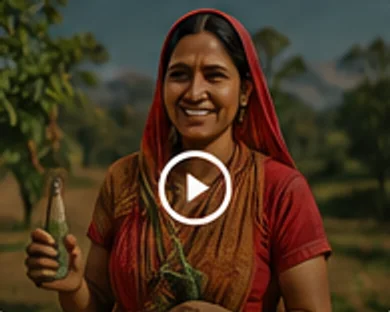
“Earlier we used to depend on rainwater. Now our farm produces year-round thanks to the irrigation project.”
Sunita DeviFarmer, Barmer, Rajasthan
Impact Over Time
This YearBeneficiariesWomen reachedYouth trained
Fund Utilisation
This Year78% of total funds utilised
Top Sectors
By ImpactDonor Spotlight
₹12.8 CrTotal contribution
Theory of Change Snapshot
Alerts & Notifications
Quick Actions
Every field project, its budget and progress
Rainwater harvestingActiveWater
Women self-help group livelihoodsActiveLivelihoods
Village road connectivityMonitoringInfrastructure
Digital literacy for youthActiveEducation
Solar pumps for farmersMonitoringEnergy
Mother and child health campsCompletedHealth
Forest produce livelihoodsActiveEnvironment
Where the work happens, state by state
States at a glancePick one to see its detail
RajasthanRisk: High
Madhya PradeshRisk: Medium
OdishaRisk: Medium
BiharRisk: High
JharkhandRisk: High
Uttar PradeshRisk: Medium
ChhattisgarhRisk: Low
Villages by state
Progress across the 17 Sustainable Development Goals
Evaluation reports, built from the same records
Theory of changeThe chain every report traces
The villages, groups and people the work is built with
VillagesEngagement score from meetings, surveys and feedback
Who the work reachesShare of beneficiaries
Community voices
“The committee meets every month now. We decide which handpump gets fixed first.”Meena Kumari · Rampura, Barmer
“Our group saved enough to buy a rice huller. Twelve families use it.”Sabita Munda · Kusumi, Kendujhar
Trends, coverage and insights drawn from programme records
Insights
Barmer harvesting cut water trips by 3x. Four more blocks match the same profile.
SHG enrolment in Odisha is up 18% over 3 months, tracking with income gains.
Procurement delays in Jharkhand and Bihar. Action needed by 15 December.
Quality education is at 81%, on course for the year-end milestone.
Beneficiary growth trendThousands, this financial year
Multi-sector coverageCoverage index, 0 to 100
CurrentBaseline
State-wise beneficiary reach
SDG performance heatmapDarker means further along
Fund receipt, disbursement and utilisation, grant by grant
GrantsUC: utilisation certificate
Monthly disbursement₹ Cr
Spend by category₹28.4 Cr
Surveys, feedback and meetings where villages shape the work
Open surveysAnswered on the field app, by SMS or in person
Reward: ₹50 mobile recharge
Reward: Village recognition
Community feedbackEvery item gets an owner and a reply
Upcoming meetings
How people take partShare of responses
Programme alerts, field updates and system notices
Manage your account, roles, notifications and preferences
Profile information
Roles and access66 people in 5 roles
NotificationsChoose what reaches you, and how
LanguageField officers can pick their own
Appearance
Sample organisation and data, for illustration.
Who sees what
NGO Manager
We set it up with you, so your team is working in it within days.
1Set up
Staff lists, leave balances, registers and spreadsheets come in once. We map your teams, roles and working hours with you.
2Work
People check in, apply for leave and move their tasks along. Managers approve from the same screen, so nothing waits on a missing reply.
3Report
Weekly reviews, attendance summaries and donor reports come from the same records, so the numbers match wherever they are shared.
The same Doptor, three ways to run it. Whichever you choose, we set it up with you.
Online (SaaS)
We host Doptor for you. Sign in from any browser or phone, and pay each month for the people and modules you use.
On your site
We set Doptor up on a computer at your office, campus or field office, so your records stay in your building.
On your own server
Run Doptor on your own server or cloud account, under your own domain, with your IT team in control.
Not sure which fits? Talk to us and we will help you choose.
Book a demo and we'll walk you through it.